Claude vs ChatGPT for developers: lessons from real ERP builds
Claude or ChatGPT? A working developer's comparison, including how we built X3 Retail ERP with parallel Claude Code agents that learn from their own mistakes.
بقلم Muhammad Safdar Iqbal · · قراءة 11 دقيقة
المقالات منشورة باللغة الإنجليزية.
If you've searched "Claude vs ChatGPT", you've probably read five articles that all end with "it depends." Fair enough, it does. But "it depends" only helps if somebody tells you on what.
I'll try. At Eaquirs Tech we use AI every working day, and the clearest test we've had so far was building X3 Retail ERP with Claude Code on a VPS. So this isn't a feature chart copied from a launch page. Part of it is a real build, with the one trick that saved us the most time. The rest is what I've noticed using both tools for writing, coding and research.
One note first. These products change almost monthly, so I'll avoid exact model names and prices that would be stale by the time you read this. For those, go to the official pages: Anthropic's pricing and OpenAI's ChatGPT pricing.
The quick answer
Pick Claude if most of your work is writing, long documents and code, and you want answers that sound like a person wrote them. It's also the one we trust for long, multi-step build work.
Pick ChatGPT if you want one app that does a bit of everything: images, voice, browsing, a huge add-on ecosystem and a generous free tier.
Pay for both if AI is part of how you earn. At one lunch a month each, it's cheap insurance against one of them having a bad day.
Now the long version, starting with the build that taught us the most.
How we built X3 Retail ERP with parallel Claude Code agents
X3 is a retail ERP: inventory, POS, purchasing, accounting, roles and permissions. That's a lot of moving parts, and the usual way to build it with AI is also the slowest: one long chat, one assistant doing everything in a row, you pasting errors back and forth.
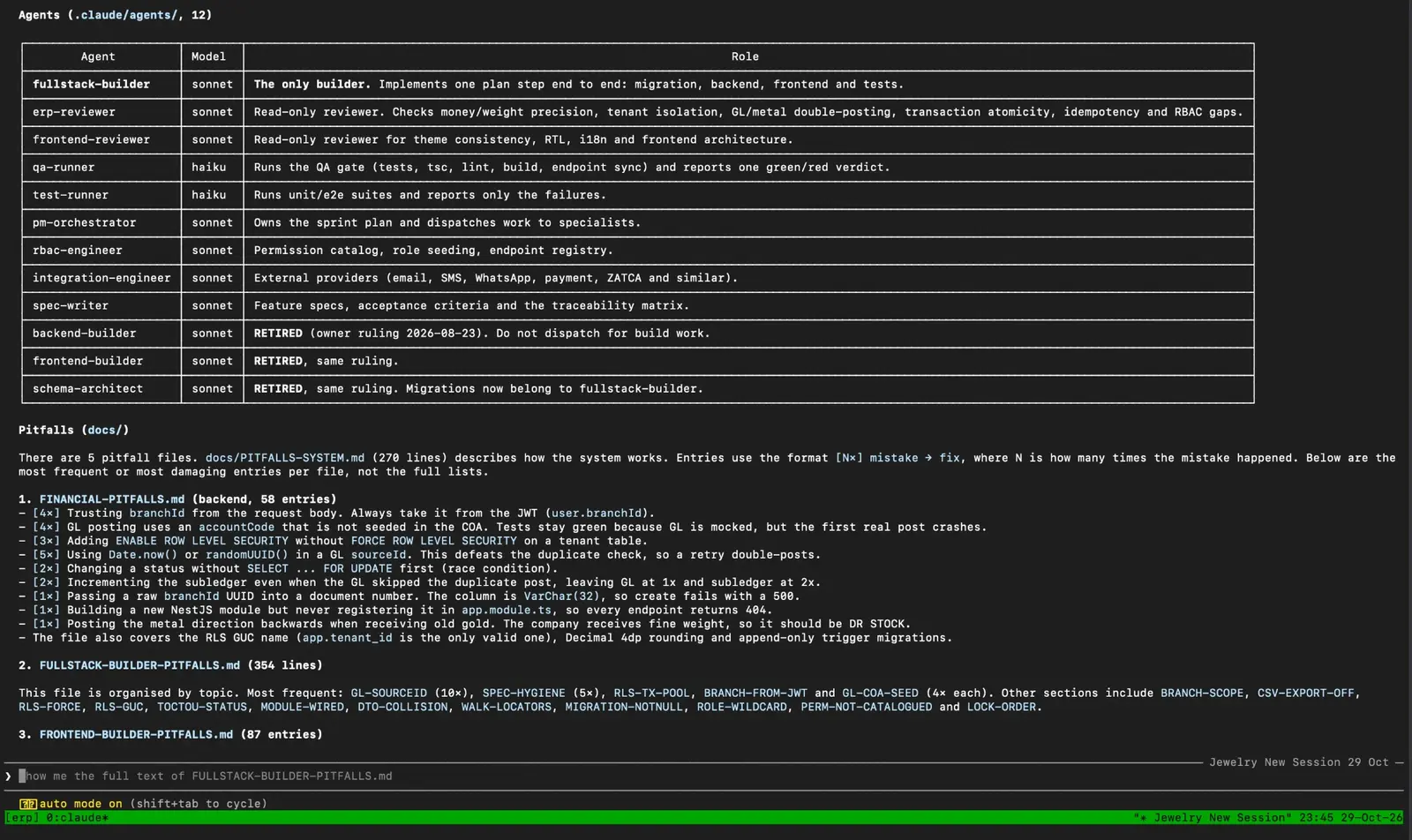
We didn't do that. We ran Claude Code inside a tmux session on a VPS, so the work kept running whether or not our laptops were open, and split the job across specialised agents. The earlier builds (X3 and EHMS) ran this way and are finished. The session below is live right now: it's the one building Ophir, our jewellery ERP. It's a real screenshot, not a mock-up:
The live tmux session building Ophir, our jewellery ERP: 12 agents, each with one job and a model matched to it.
The team looks like this:
pm-orchestrator: owns the sprint plan and hands work to the specialists.
spec-writer: feature specs, acceptance criteria and a traceability matrix, so every requirement maps to something built and tested.
fullstack-builder: the only builder. It takes one plan step and does it end to end: migration, backend, frontend and tests.
erp-reviewer: a read-only reviewer that checks money and weight precision, tenant isolation, double-posting, transaction safety, idempotency and permission gaps.
frontend-reviewer: a read-only reviewer for theme consistency, right-to-left layouts, translations and frontend structure.
rbac-engineer: the permission catalogue, role seeding and endpoint registry. In an ERP, "who is allowed to do this?" matters on almost every screen.
integration-engineer: email, SMS, WhatsApp, payments and tax-authority integrations.
qa-runner and test-runner: run the tests, type-check, lint and build, then report one green or red verdict, or only the failures.
Three things in that list are worth pointing out.
We changed the team along the way. The screenshot shows three older agents (a separate backend builder, frontend builder and schema architect) marked RETIRED. The problem was hand-offs. The backend agent would finish its part and stop. Then the frontend agent had to read everything again from scratch, and sometimes it missed context the backend agent had already worked out. Details got lost between the two. So we retired them and gave one fullstack-builder each plan step end to end, migration, backend, frontend and tests. With the whole step in one head, the misses went away. A team structure isn't sacred. If an agent hand-off keeps losing context, merge the two agents.
Reviewers can't edit. They're read-only on purpose. The one that finds the problem isn't the one that "fixes" it quietly.
Cheap work goes to a cheap model. The builders, reviewers and orchestrator run on Sonnet. The two agents that only run test suites and report results run on Haiku, because they don't need to think hard. That matters when you're watching your token bill.
None of this is magic. It's how a small human team works, copied into agents. The part that made it genuinely better is next.
The pitfalls file: the system that learns
Every time a reviewer catches a mistake, the builder doesn't just fix it. The lesson goes into a pitfalls file as a short rule, in a fixed format: [N×] mistake → fix, where N counts how many times it has happened.
Every new builder reads those files before writing a single line. So the same mistake doesn't happen twice. The team gets a little smarter with every review.
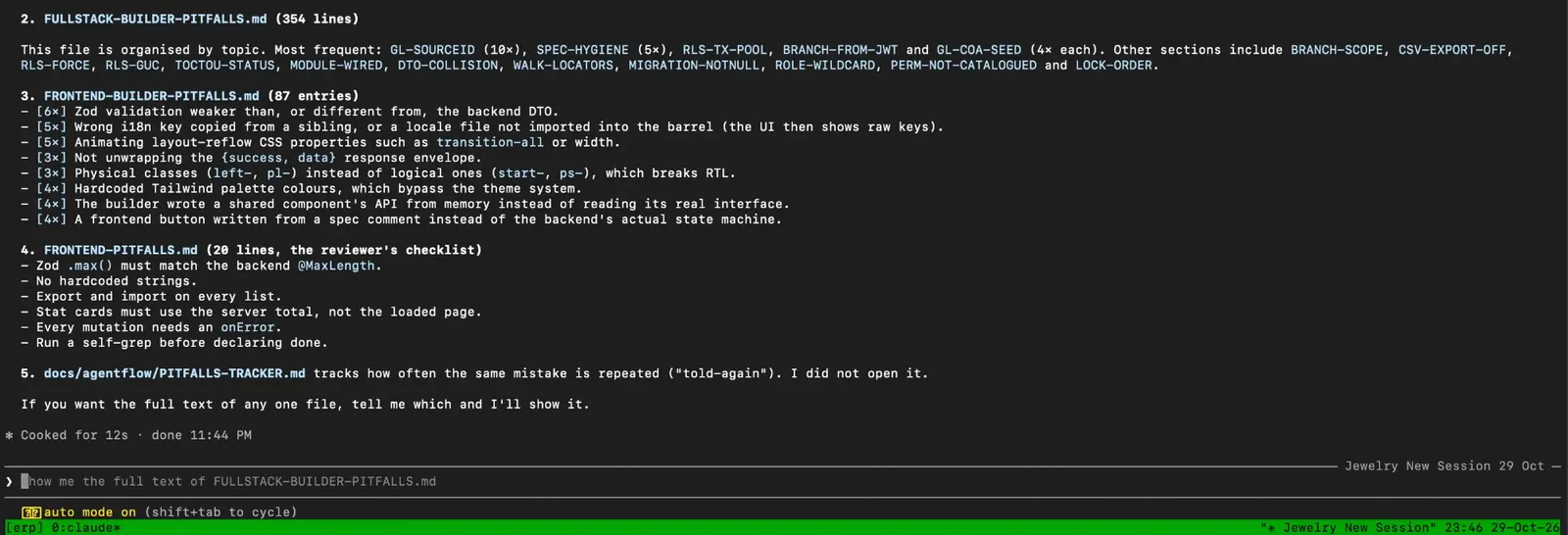
Pitfalls files from the Ophir session, each entry counted by how many times the mistake happened.
On Ophir we now have five of these files: one for money and accounting (58 entries), one for the full-stack builder, one for the frontend (87 entries), a short reviewer checklist, and a tracker that counts how often the same mistake is told again. A few real entries show what a good rule looks like:
[4×] Trusting branchId from the request body. Always take it from the login token.
[5×] Using Date.now() or a random ID as the key of an accounting entry. That defeats the duplicate check, so a retry posts the money twice.
[6×] Frontend validation weaker than, or different from, the backend's.
[3×] Using left and right CSS classes instead of start and end ones, which breaks Arabic and Urdu layouts.
Notice what these are: specific, checkable and a little embarrassing. That's exactly why they work.
What that did for us:
Fewer fix rounds. The classic loop (build, review, fix, review, fix again) mostly stopped repeating the same errors.
Less time and fewer tokens spent on rework. Fixing a mistake once, and writing down why, is cheaper than discovering it again in the next module.
Knowledge that stays. It lives in a file, not in one chat window that disappears.
The same workflow built X3, then EHMS, our hospital management system, and now Ophir. Here's the number I care about most, and it's my own estimate rather than a lab measurement: before the pitfalls file, the tokens I spent on one project covered one project. After it, the same budget stretched to roughly three. The saving isn't a cleverer prompt. It's that we stopped paying again and again for the same mistakes.
This is the real lesson, and it applies to any AI tool: the model matters less than the system you put around it. A decent model with a good feedback loop beats a brilliant one that forgets everything between sessions.
To be fair to ChatGPT, I'm not saying it couldn't do this. This is simply the setup we built and ran, with Claude Code. What I can say is that Claude held up well in long, tool-heavy sessions, followed written rules (like the pitfalls file) reliably, and stayed on task across a large codebase.
You don't need seven agents to use this. It works with one assistant and a text file, in Claude, ChatGPT or anything else.
Create a PITFALLS.md in your project. Plain Markdown, one rule per line.
Write rules, not stories. "Take the branch from the login token, never from the request body" is useful. "We had a bug last week" is not. Add why in a few words, and a count ([3×]) each time it happens again, so the worst offenders float to the top.
Make the assistant read it first. In Claude Code, put the instruction in your project's CLAUDE.md: "Read PITFALLS.md before writing code." In a normal chat, paste the file at the start.
Add a rule every time review catches something. Whoever finds the mistake (a reviewer agent, a teammate or you) writes the rule in the same minute. That habit is the whole system.
Keep the file short. Once it grows past a page or two, group the rules by area (database, permissions, UI) and delete the ones that no longer apply, because a long, stale list gets ignored just like a long, stale checklist.
It's boring, and it works for the same reason checklists work in hospitals and aeroplane cockpits: people (and models) are good at following a rule and bad at remembering last month's mistake.
Writing: the difference you can hear
This is where most people first notice a gap.
Claude's writing tends to read more naturally. Less filler, fewer "in today's fast-paced world" openers, and it holds a tone better. Ask it to sound like a tired project manager and it keeps that voice for the whole piece.
ChatGPT is a very capable writer and is often quicker to a decent first draft. Its habit is to sound a little polished and a little samey: lots of lists, tidy conclusions. You can steer it away from that, but you have to ask.
My rule: anything a customer or a boss will read word for word, I start in Claude. Brainstorming ten angles in two minutes, ChatGPT is great.
Coding: both good, different personalities
Claude is strong on large, multi-file work. Give it a messy codebase and a clear task and it tends to keep the existing style and explain what it changed. ChatGPT is excellent for quick questions, explaining an error, a one-off script or seeing a concept three different ways.
My honest habit: ChatGPT for the quick question, Claude for the real build.
Research and long documents
Hand either one a 60-page PDF and you'll get a useful summary. Claude tends to say "I'm not sure" more often than it bluffs, and that has saved us from a few confident-sounding mistakes. ChatGPT's strength is reach: browsing, data charts and connected apps help when the answer lives out on the web.
Neither is a source of truth. Both can be wrong in a calm, convincing voice. If a number or legal claim matters, open the original.
Images, voice and extras
ChatGPT has the broader toolbox: image generation, voice conversation and a big library of custom assistants. If you want one app on your phone that can chat, draw and talk, that's ChatGPT's home turf.
Claude is more focused on text, documents, code and analysis. It's growing on connected tools through MCP, the Model Context Protocol, an open standard that lets an assistant work with outside apps in a controlled way. Our write-up of the Upwork MCP server is a real example.
Price, limits and privacy
Both have a free tier and a paid plan in the same ballpark, with pricier tiers for heavy users and teams. Check the official pages above for current numbers. What matters more than the sticker price:
Usage limits. How much you can do before being told to wait. For long sessions, this decides whether you're happy.
Which model you get. The best one is usually on the paid plan.
Data controls. Read what each provider does with your data. Business plans have stronger controls than free ones. Never paste passwords, patient records or anything your contract says to keep private into a personal account.
If you're building a product with AI, rather than chatting, compare the API pricing instead. That's what each request costs to run, and it's a different calculation.
Which one should you use?
If you mostly...
Start with
Write emails, articles, proposals, reports
Claude
Build or maintain a real codebase
Claude, ChatGPT for quick questions
Run long, multi-step build tasks
Claude Code
Want images, voice and a big add-on library
ChatGPT
Want the widest free tier to try things
ChatGPT
Read and compare long documents
Claude
Need quick web answers
ChatGPT
Earn partly through AI
Both
A ten-minute test: take one real task from this week and give the exact same prompt to both. Don't judge the first answer. Judge which one needs less fixing after a reply or two. That's the one that saves you time.
Common questions
Is Claude better than ChatGPT for coding? For large, multi-file work and long agent sessions, we found Claude (through Claude Code) very dependable, and it's what we used to build X3 Retail ERP. For quick questions and one-off scripts, ChatGPT is just as handy. Many developers use both.
Can I use Claude and ChatGPT together? Yes, and many people do. A common split is ChatGPT for quick questions, images and web lookups, and Claude for writing, long documents and building.
Is Claude free? There's a free tier with limits, and paid plans for heavier use. ChatGPT works the same way. Check Anthropic's pricing and OpenAI's pricing for current plans.
Can AI agents build a whole ERP on their own? Not safely. Our agents wrote most of the repetitive code, but reviewer agents checked it and senior engineers approved every release. AI makes a good engineer faster. It doesn't replace the person who understands the business.
What is the pitfalls file? A shared file where every mistake a reviewer finds is written as a short rule. New builder agents read it before they start, so the same error isn't made twice.
The tool is not the product
The biggest mistake we see isn't picking the wrong chatbot. It's thinking a chatbot is a software team. A good assistant, a good process and a good senior engineer together are what ship software quickly.